How to Tell If an Image Is AI Generated

The advice everyone remembers is to count the fingers. That stopped being reliable around 2024, and most of the other visual tells people still repeat have gone the same way.
What works now is checking in the right order. Provenance first, because it is the only evidence that is not a guess. Visual inspection last, because it is the least reliable thing you can do.
Check for a watermark first
This is the single most useful step and the one most people skip.
Several large models now embed an invisible marker at the moment the image is created. Google’s SynthID embeds a watermark directly into AI-generated images, audio, text and video. It is imperceptible to a person but detectable by the matching tool, and it is designed to survive cropping, filters and lossy compression.
The easiest way to run that check on a phone is in the Gemini app. Upload a single image and ask whether it was created or edited by Google AI, or type @synthid to start the check. It only reads Google’s own watermark, so a ChatGPT or Midjourney image comes back empty, and early testers hit days when the check simply refused to run.
Two things to understand before you rely on this:
- A positive result is strong evidence. If a detector finds a SynthID watermark, the image came from a model that writes one.
- A negative result proves nothing. It means the image did not come from a participating model, or the marker was stripped. Plenty of AI images carry no watermark at all.
That asymmetry matters. A clean check is not a clearance, and it does not make the image real.
What C2PA Content Credentials tell you
Content Credentials are the public name for C2PA, the standard written by the Coalition for Content Provenance and Authenticity. Where a watermark hides a mark inside the pixels, C2PA attaches a signed manifest to the file. The manifest names the software that produced the image, the time it was made, and edit history, so you can read what happened to the picture after it left the camera or the model.
When the credentials are intact, you get answers that no amount of squinting will give you:
- Which tool wrote the file, and whether that tool was a camera or a generator.
- Whether the image was generated from a prompt, or edited from an earlier photograph.
- Which edits were applied afterwards, including crops, retouching and generative fill.
- Whether the signature still validates, or somebody has altered the file since.
Adobe, Leica, Nikon, Sony, OpenAI and Google are all involved in C2PA Content Credentials to different degrees, so you will see manifests on both camera files and generated ones. You can read them in Adobe’s free Content Credentials inspector, or in any viewer that supports the standard.
The weakness is the same as with watermarks. Credentials are easy to lose. Most social platforms re-encode uploads and throw the manifest away, screenshots drop it by definition, and anyone with a copy of the file can strip it on purpose. So C2PA data is excellent when it is there and tells you nothing when it is gone.
Do a reverse image search
Take the image to a reverse search engine and see where else it has appeared. This answers a different question from “is this image generated”, and it is often the question you actually care about.
If an image claims to show a real event and returns no earlier appearances anywhere, that is a red flag. Real newsworthy photographs are republished, credited and indexed. A photo that appears to have sprung into existence yesterday, with no source and no photographer, deserves suspicion regardless of how it was made.
Zero results is a signal, not a verdict. New real photographs also have no history. What you are looking for is the opposite of silence: an earlier, larger, better-credited version of the same frame, which usually settles the question in a minute.
Read the metadata
A photograph taken with a camera or a phone normally carries EXIF data: camera make and model, exposure settings, a timestamp, sometimes GPS coordinates. Generated images have none of that, because no camera was involved.
So missing EXIF data is a clue. It is a weak one, because:
- Most social platforms strip EXIF from everything on upload.
- Anyone can remove it deliberately in seconds.
- Some generators now write plausible-looking metadata of their own.
Our EXIF viewer reads what the file actually carries, which at least tells you whether there is anything to work with. A file with full camera data including a lens model and an exposure triangle is evidence of a real photograph. A file with nothing is evidence of very little.
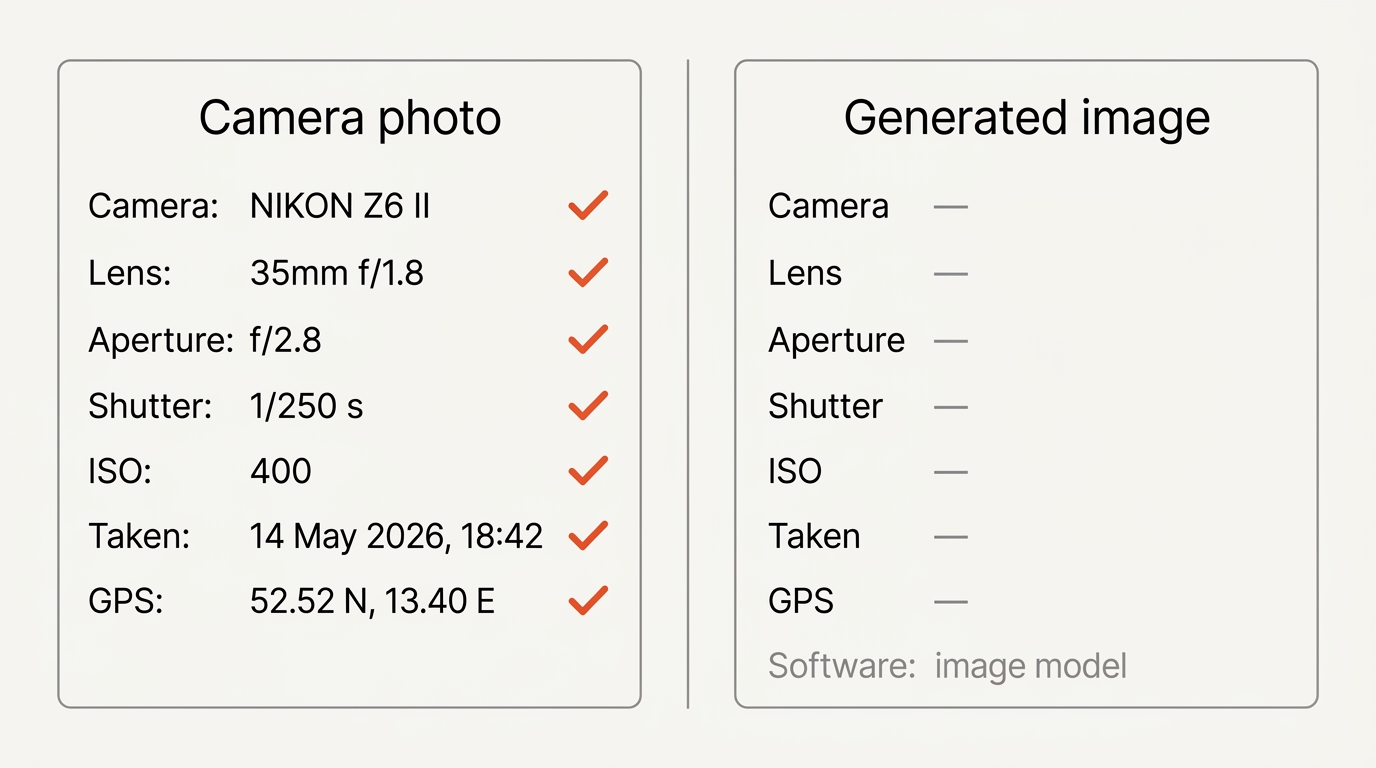
Two details are worth knowing when you read a file this way. Generators sometimes leave their own fingerprints in the software field, so look for a model name where you would expect a camera body. And the file size and dimensions can give the game away on their own, because many models output at fixed sizes such as 1024 by 1024 that no camera sensor produces.
Then look at the image itself
Visual inspection comes last because modern models have fixed most of the famous tells. Hands are usually fine now. Faces are usually fine. What still goes wrong is harder to describe and easier to feel.
Text and typography. Still the most reliable giveaway. Signage, book spines, product labels and background posters turn into letterforms that look like writing without being words. Zoom in on any text in the image.
Repeating patterns. Railings, tiles, brickwork, crowd faces, rows of windows. Follow a pattern across the image and watch for the point where the rhythm breaks or a line bends without reason.
Complex materials. Hair at the hairline, knitted fabric, fur, lace and anything woven. These render convincingly at a glance and fall apart at 200 percent zoom.
Physics of reflections and shadows. Check whether shadows all fall the same way, whether a reflection matches what is in front of it, and whether glass and water behave consistently.
Jewelry and glasses. Where an object meets skin is still a weak point. Earrings merge into earlobes, glasses arms vanish into hair, chains fuse at the clasp.
Edges and backgrounds. Backgrounds often have a dreamlike quality: objects that do not quite resolve, architecture that cannot be built, depth of field that blurs by proximity rather than by distance.
For any of this you need the full-size file. A thumbnail hides everything useful, so download the original and zoom into the corners rather than judging a 600-pixel copy in a feed.
Why this is getting harder
Each generation of model closes the gap, and the tells that work this year will not work next year. Anyone who tells you they can reliably spot AI images by eye is describing last year’s models.
There is a second problem that works in the other direction. As people get better at spotting fakes, they also get better at misidentifying real photographs as fake. Unusual lighting, heavy retouching or an odd composition now gets called AI routinely. Being too suspicious has its own cost.
Do not trust detector tools alone
Plenty of sites offer to tell you whether an image is AI generated. Treat the output of any AI image detector as one input among several.
There are really two kinds of tools wearing the same label. An image detector that reads watermarks and C2PA Content Credentials is checking something concrete, and its positives are meaningful. An image detector that guesses from pixels alone is running a classifier trained on older models, and it will confidently mislabel both ways.
Published accuracy figures for the guessing kind are measured against test sets, not against the image in front of you. Run the same picture through three of these tools and you can easily get three different answers, which is a useful experiment to do once before you start quoting any of them.
The failure mode is specific: somebody runs a photo through one detector, sees a green result and calls the image authentic. That conclusion does not follow from that evidence.
A practical order of checks
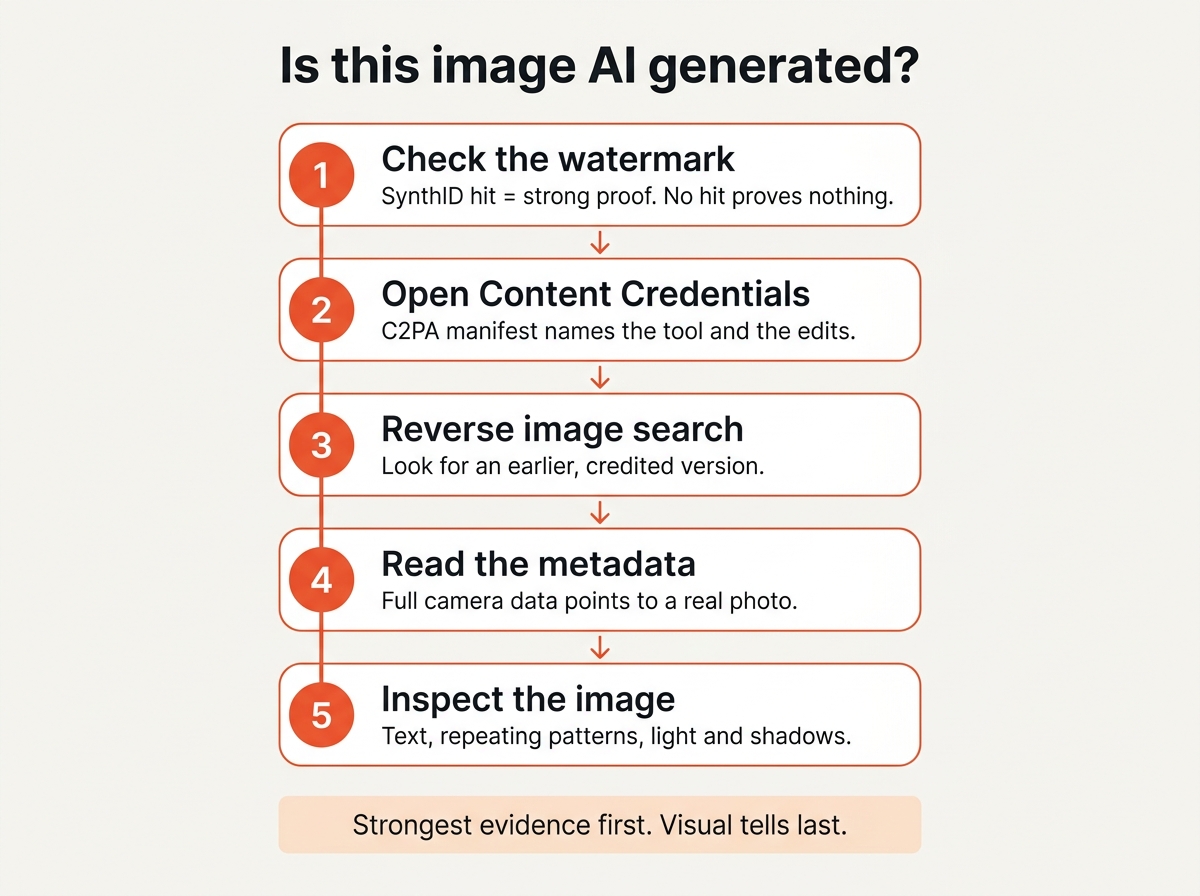
For anything that matters, work down this list and weigh the results together:
- Check for a watermark. A hit is strong evidence. A miss is not.
- Open the Content Credentials. C2PA data names the tool and the edits, when it survived.
- Reverse image search it. Look for earlier appearances, a credited photographer, a news source.
- Read the metadata. Full camera data points towards real. No data points nowhere in particular.
- Inspect text in the image. Zoom in on every sign, label and caption.
- Follow the repeating patterns. Railings, tiles, crowds, windows.
- Check the light. Shadows, reflections and highlights that disagree with each other.
- Ask who benefits. An image that arrives exactly when somebody needs it to be true deserves more scrutiny than a photo of a cat.
No single step settles it. Several pointing the same way usually does.
When it does not matter
Most of the time, it does not. A generated header image on a blog post is a stylistic choice, not a deception, and the same is true of an illustration in a presentation or a background on a landing page.
The question becomes serious when an image is presented as evidence: a news photograph, a product shot, a before-and-after, a picture of a person who is supposed to be real. That is where the checks above earn their time.
If you publish images yourself, the reverse of this applies. Keep the originals, keep the camera data where privacy allows, leave the Content Credentials in place, and say plainly when something was generated. Our guide to free stock photos and AI images covers what you can use and how to label it.
Quick answers
Is there a reliable tool to detect AI images?
For images carrying a watermark or C2PA Content Credentials, yes. For everything else, an image detector is guessing, and these tools are wrong in both directions often enough that you should not rely on one alone.
Do AI generated images have EXIF data?
Usually not, because no camera was involved. Missing EXIF is weak evidence though, since platforms strip it from real photos too.
What is the most reliable visual tell?
Text inside the image. Signage, labels and book spines still come out as letter-shaped shapes rather than words far more often than anything else fails.
Can reverse image search tell me if an image is AI?
Not directly. It tells you where an image has appeared before, which is often more useful, particularly when the picture claims to document a real event.
Why do AI images look so real now?
Because each model generation fixes the previous one’s artifacts. The tells that worked two years ago, like malformed hands, have largely been solved.
Does a screenshot keep the Content Credentials?
No. A screenshot is a new file written by your operating system, so the C2PA manifest and any EXIF data are gone. Always work from the original file when you can.
The short version
Check for a watermark first, read the Content Credentials second, reverse search third, metadata fourth, and only then start looking at fingers and railings.
And hold your conclusion loosely in both directions. The confident claim that an image is definitely AI is wrong about as often as the confident claim that it definitely is not.